
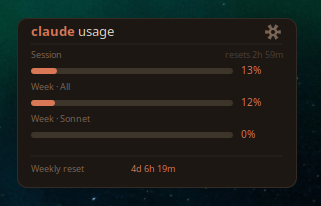
A small always-on-top panel showing how much Claude quota is left: the 5-hour session, the weekly cap across all models, and separate Sonnet and Opus bars, color-coded as they fill. It picks up Claude Code credentials automatically, or accepts a pasted OAuth token if you do not run Claude Code.
Overview
A lightweight Linux desktop widget that displays your Claude subscription usage in real-time — session limits, weekly caps, and reset timers.
Features
- Real-time usage bars — Session (5h), Weekly (all models), Sonnet, and Opus
- Color-coded thresholds — Green (<50%), Amber (50-85%), Red (>85%)
- Draggable — Click and drag the title bar to reposition
- Adjustable transparency — Opacity slider in settings
- Auto-detects Claude Code — If you have Claude Code installed, it finds your credentials automatically
- Manual token support — Paste your OAuth token if you don't use Claude Code
- Persists settings — Position, opacity, and credentials survive restarts
Requirements
- Linux with a compositing window manager (GNOME, KDE, etc.)
- Python 3.8+
- GTK3 Python bindings
sudo apt install python3-gi python3-gi-cairo
Install
# Clone or download
git clone https://github.com/boutabyte/claude-usage-widget.git
cd claude-usage-widget

# Make executable
chmod +x claude-usage-widget.py

# Run
./claude-usage-widget.py
Connecting Your Account
Option 1: Claude Code (automatic)
If you have Claude Code installed and authenticated, the widget detects your credentials automatically. Just launch it.
Option 2: OAuth Token (manual)
- Click the gear icon on the widget
- Paste your Anthropic OAuth access token (
sk-ant-oat01-...) - Click "Connect Account"
To get your token, check ~/.claude/.credentials.json after authenticating with Claude Code, or use the Anthropic OAuth flow.
Autostart
To launch the widget on login:
# Create autostart entry
mkdir -p ~/.config/autostart
cat > ~/.config/autostart/claude-usage-widget.desktop << 'EOF'
[Desktop Entry]
Type=Application
Name=Claude Usage Widget
Exec=/path/to/claude-usage-widget.py
Hidden=false
NoDisplay=false
X-GNOME-Autostart-enabled=true
EOF
Configuration
Settings are stored in ~/.config/claude-usage-widget/settings.json:
{
  "opacity": 0.90,
  "x": 1620,
  "y": 60
}
Credentials (if manually provided) are stored in ~/.config/claude-usage-widget/credentials.json.
How It Works
The widget polls the Anthropic OAuth usage API (/api/oauth/usage) every 30 seconds using your OAuth access token. It displays:
| Meter | Description |
|---|---|
| Session | 5-hour rolling usage window |
| Week - All | 7-day usage across all models |
| Week - Sonnet | 7-day Sonnet-specific usage |
| Week - Opus | 7-day Opus-specific usage |
Built by Boutabyte
License
MIT